Social Icons

Tuesday, March 18, 2014

UBUNTU 12.04 LTS beats Windows 7,MAC @ GCHQ Report

1.    Now this is some good news for all Ubuntu lovers.Ubuntu 12.04 LTS has topped a UK security agency’s security assessment of mobile and desktop operating systems.CESG (originally Communications-Electronics Security Group) is the group within GCHQ(an intelligence and security organization, working to keep Britain safe and secure in the challenging environment of IT communications).CESG conducted a series of tests in the last few months to review a set of 11 operating systems which currently run on various devices such as desktops, laptops, servers, mobile phones and tablets. The security assessment included the following categories:

    - VPN
    - Disk Encryption
    - Authentication
    - Secure Boot
    - Platform Integrity and Application Sandboxing
    - Application Whitelisting
    - Malicious Code Detection and Prevention
    - Security Policy Enforcement
    - External Interface Protection
    - Device Update Policy
    - Event Collection for Enterprise Analysis
    - Incident Response


2.   Ubuntu 12.04 LTS is the only operating system to fully pass 9 of the 12 listed security recommendations above.Ubuntu was marked down on VPN and encryption because its implementation/software has yet to be independently assessed by an approved CESG body.The VPN issue is likely to be addressed in the UBUNTU 14.04 LTS thats likely arrival date is somewhere in Apr 2014...ie in another about two months from now.

3.    The list of operating systems which were compared are mentioned below :

- Windows 7/8
- Android 4.2
- Samsung devices with Android 4.2
- Apple iOS6
- Apple OSX 10.8
- Blackberry 10.1(EMM Corporate)
- Blackberry 10.1(EMM Regulate)
- Google Chrome OS 26
- Windows 8 RT
- Windows Phone 8


4.  What Canonical has to say about this

“We are working hard to close the gap and make Ubuntu clearly stand out as the most trustworthy operating system for the future and we hope to make excellent progress before our next LTS release in April 2014, 14.04 LTS, which will be even better,” Darryl Weaver, Canonical Sales Engineer

5.  Few screen shots from web with this news :


6.   Source of news as above...thanks http://www.zdnet.com

Sunday, March 16, 2014

Installing Dongle on Ubuntu : Mobile Internet@USB MODEM

1.   Writing after a long time... I post here few lines that I recently learnt on installing and accessing internet vide Dongle with SIM on Ubuntu LTS 12.04.So in my case I have a Micromax dongle with a mobile Sim.

2.  Simply said the steps are mentioned below :

- Insert the USB dongle in any of the USB drives on your PC/Laptop.

- Goto Terminal and login as Root


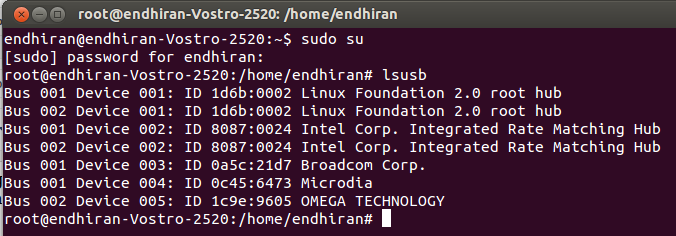
- At the terminal get the details of the usb detected interfaces by typing lsusb


- So in my case the dongle detected is shown at the end ie OMEGA TECHNOLOGY

- Now we need to run a terminal command to mount the device and get it running as shown in the screen shot below
sudo modprobe usbserial vendor=0x1c9e product=0x9605

- Once the command is executed at the terminal,wait for few minutes and you see the additional ENABLE MOBILE BROADBAND as seen in the screen shot below....
 
 
3.   and with this you should be on with the internet....

Wednesday, January 01, 2014

Nessus Installation @ Backtrack R3

1.   This post speaks less and shows more about how to install Nessus in Backtrack R3.Also it is assumed that the user is connected to the Internet while installation is in progress.

First Step :  Get to the terminal and type apt-get install nessus

 closer look to the above screen shot as in terminal.

 This screen shot shows a progress shot whilst installation is in progress....

 Installation gets over here....as seen

 Second Step : Creating a user for login into the Nessus Interface.........

 You get to see the following after you have created the user....
 Third step : Visit the website as seen in the screen shot below :
 
 Fourth Step : Click on the Home user option and register with your e-mail id.You get a activation key in few seconds at your e-mail.

 Fifth Step :  After you get the key...type in the following syntax followed by the key that you get in ur email id....
 A closer look of the above screen shot

 After you the user is registered he gets to see the following screen :

 Sixth Step : Now open your Backtrack Mozilla Browser and type in the following address as shown in the screen shot here.This initialising takes a little time...mine took 4 minutes and more...
 A closer look at the address .......
 Once initialised you get the following screen for login
 Here you are...the login screen for Nessus...

Tuesday, December 31, 2013

New Laptops without Windows 8 @ Rare

1.   Strange it may seem but the current availability of Laptops for sale in the market show a peculiar sad state of specs...ie they are available only with Windows 8.There are rare options on few sites that offer New laptops for sale without Windows OS.I have been planning to buy a laptop with i3/i5 processor and in my search over various sites I came across this sad but surprising stat.

2.  Infact leading online shopping retails in Dubai have got NIL option to buy a laptop without Windows 8.I checked up at the following sites :

- http://www.carrefouruae.com/
- http://www.ic4uae.com/

3.   Even the options without Windows 8 on leading retails in India have much lesser options then with Windows 8. Checked up at Flipkart, snapdeal,timesofindia shopping to mention a few.
 

 4.   Given these facts...it looks like Microsoft has put in rigorous and vigorous marketing efforts to increase there sales graph for Windows 8.For those guys who wish to buy Windows 8 laptop and then attempt removing the windows and install some Linux flavour...it is equally surprising that unlike till Windows 7 wherein it was relatively a matter of deleting Windows and installing Linux...it is complex removing Windows 8 so the user has to be content with a dual boot option wherein he has to compromise with wastage of space dedicated to Windows....

5.  Thus there is a kind of binding that comes along with these laptops with Windows 8 that you cannot mov to another OS.....:-(

Saturday, November 23, 2013

BACKTRACK 5 R3 : 0trace

This post is going to introduce you to a "Identify Live Hosts" tool by the name of 0trace that enables a user to perform hop enumeration (“traceroute”) within an established TCP connection, such as a HTTP or SMTP session. This is opposed to sending stray packets, as traceroute-type tools usually do. The important benefit of using an established connection and matching TCP packets to send a TTL-based probe is that such traffic is happily allowed through by many stateful firewalls and other defenses without further inspection (since it is related to an entry in the connection table).

How to reach 0trace ?
(Click to enlarge)
(Click to enlarge)
(Click to enlarge)

The command syntax :

root@bt:/pentest/enumeration/0trace# ./0trace.sh eth0 (IP ADDRESS1)

and then you need to then open another terminal and connect using netcat as below

root@bt:~# nc (IP ADDRESS1) 80

Here in the example as shown vide screenshots,i have used a web site ip address for sample check....without opening the second terminal window...you will not get any progress on the first terminal....
Powered By Blogger